artificial intelligence (AI) workflows · Proposal for an agency

Research that does the repetitive work

A proposal for a design and advertising agency: eight research workflows, a hub to run them from, and safeguards for client data. Researchers keep every decision. The workflows do the collecting, transcribing, tagging, clustering, and first drafts.

ProposalTwo demos you can run27 October 2026

About this proposal

This page is a proposal. It sets out how a design and advertising agency could automate the repetitive middle of user research. It also covers how to build the tools. It uses the same pattern as the six workflows on the Workflows page, which I built for a real team. The agency, its clients, and every figure in the demos are invented.

  • WorkflowsProposal

    Workflow runner: five research workflows

    Interview synthesis, feedback and intent, an answer engine audit, a behaviour digest, and a journey draft. Each one stops for a person, and ends with a visual decision report.

  • WorkflowsProposal

    Research hub demo: the agency portal

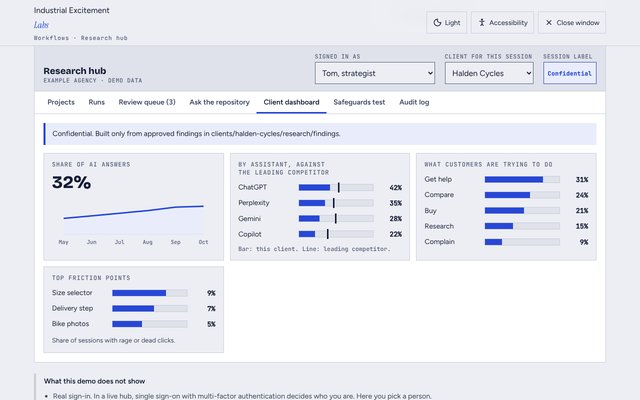
    Start a project, follow every run, review AI drafts beside their evidence, search past research, and try to break the safeguards.

    • 136 to 44research hours on a typical project
    • 92hours saved on each project, about 68%
    • 920hours a year across 10 research-led projects
    • 5hours a month saved for each client on answer engine monitoring
    • 8workflows, all built to one pattern

    The time figures are planning estimates for a mid-sized website or campaign project. An agency should check them against its own timesheets during a pilot before it relies on them.

    The hub is built on the shared memory and security design. It uses the same broker, labels, folders, and audit log. So research gets the same protection as any other client work.

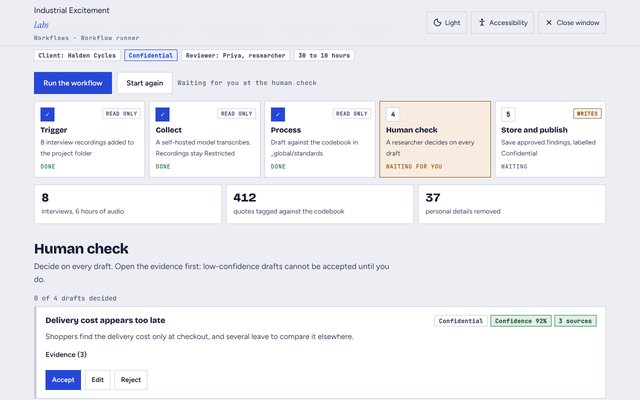
    Two demos you can use. The workflow runner takes five workflows from start to finish, including the human check, drag and drop, and the project plan. The research hub demo shows the portal a team would use every day, with its safeguards working.

    The research process, and where automation fits

    Most agencies follow the same research steps on every project. Each step in the chart keeps a decision for a person. Select a step to show what the workflow does, what the person decides, the hours before and after, and an example of what it produces.

      A workflow does most of this step A person decides here The process goes back to an earlier step

      One pattern for every workflow

      Every workflow follows the same five steps. One pattern means a workflow built for one client works for the next, with only the inputs changing.

      1. TriggerA new project, a file in a folder, or a schedule starts the run.
      2. CollectConnectors pull the data: analytics, heatmaps, surveys, reviews, recordings.
      3. ProcessAn AI model transcribes, tags, clusters, and drafts, using a fixed prompt and codebook.
      4. Human checkA researcher reviews and edits every draft. This step is never skipped.
      5. Store and publishResults go to the research repository and into a branded report.

      The four main areas

      These four areas hold most of the repetitive work, so they hold most of the saving.

      Area 1

      Answer engine optimisation (AEO)

      20 to 5 hours for the first audit, and 6 to 1 hour a month for monitoring

      AEO measures whether AI assistants such as ChatGPT, Perplexity, Gemini, Copilot, and Claude mention a brand, cite it, and describe it correctly.

      1. Write 50 to 150 buyer questions from the client's keywords, FAQs, and support tickets.
      2. Ask every assistant the same questions on a schedule.
      3. Score each answer: mentioned, position, cited page, accuracy, competitors named.
      4. Check the client's pages for clear question headings, short answers, and structured data.
      5. A strategist ranks the gaps, and a monthly digest goes to the client.

      Tool ideas A question-set generator, a share-of-answer dashboard, an alert for wrong facts, and a content brief for each gap.

      Area 2

      User journeys and personas

      16 to 7 hours on each project

      The workflow assembles the evidence. The team still writes the story, in a workshop.

      1. Pull approved findings from the repository.
      2. Map each finding to a journey stage: aware, consider, compare, buy, use, recommend.
      3. Draft the goal, actions, feelings, pain points, and opportunities for each stage, with quotes linked.
      4. Add drop-off rates, rage clicks, and the places people now ask an AI assistant.
      5. Build a FigJam board from a template, ready for the workshop.

      Tool ideas A journey board generator, a persona builder with confidence levels, and a check for stages with fewer than three pieces of evidence.

      Area 3

      Heatmaps and behaviour

      14 to 4 hours on each project

      Today a researcher watches dozens of recordings at random. The workflow picks the 10 to 20 that show friction.

      1. Install Microsoft Clarity or Hotjar on every client site at kick-off, with a standard tag plan.
      2. Pull scroll depth, rage clicks, dead clicks, and quick-backs every day.
      3. Pick the recordings with friction on key steps.
      4. Draft a digest: the top five friction points, the page, the reach, and a test to try.
      5. A researcher watches the linked recordings before the digest goes anywhere.

      Tool ideas A friction score for every page, a before and after comparison for each release, and a test hypothesis for each friction point.

      Area 4

      Interviews, feedback, and intent

      30 to 10 hours for interviews, and 18 to 5 hours for feedback

      Transcribing, tagging, and first themes are the most repetitive research tasks. AI drafts, and people decide, because studies show AI still mis-tags quotes.

      1. Transcribe each recording with speaker labels, and remove personal data.
      2. Tag every quote against the shared codebook.
      3. Cluster tags into candidate themes, with counts and quotes.
      4. A researcher merges, splits, and renames the themes on a digital affinity map.
      5. Sort reviews, tickets, and searches by intent: research, compare, buy, get help, complain.

      Tool ideas A quote finder across past projects, a discussion guide generator, and a live voice of the customer dashboard.

      Three more workflows

      Together these save about 25 hours on each project, at the start and the end of the research.

      • Kick-off, 10 to 4 hours. An intake form sets up the project workspace and a draft research plan. Stakeholder interviews become goals, assumptions, and success measures.
      • Desk and competitor research, 16 to 5 hours. An agent fills a comparison grid with each competitor's offer, prices, reviews, and AI visibility. A strategist adds the point of view.
      • Reporting, 12 to 4 hours. Approved findings fill a branded slide template with the finding, the evidence, a quote, and the recommendation.

      Work out the time saved

      Change the figures to match an agency. The results update as you type. Hours come from the estimates on this page, and the value uses the hourly cost you enter.

      A pilot that confirms 70% of the estimate still saves about 64 hours a project. The bars show hours on one project, before and after.

      The best way to build the research hub

      The biggest gain for the team is one place to start research, follow it, and review what the AI drafted. Researchers should never need to open the automation tool itself. Research into how teams build these tools points to five decisions.

      The research hub demo shows the result: start a project, review drafts beside their evidence, search past research, and try to break the safeguards.

      1. Build in three stages, not all at once

      Low-code tools such as Retool suit a team of under 20 people that needs a tool within weeks. A custom app costs less over three years once there are 50 or more users, or once clients need their own access. So prove the workflows first, then choose how to build the front end. The stages follow the 20-week delivery plan for the shared memory, because the hub needs the memory broker.

      How to build the hub, stage by stage
      StageWhat to buildMove on when
      Weeks 1 to 6, while the memory is designedNo hub yet. Run the first three workflows in a self-hosted n8n for the pilot clients, saving to the memory folders with the four labels.The pilot shows real hours saved
      Weeks 7 to 16, the memory pilot and rolloutAn internal hub in a low-code tool, connected to the memory broker during its pilot. Project launcher, run status, review queue, and search.The broker is live, and more than 20 staff use the hub
      From week 17, after the security reviewA custom app with a Postgres database that keeps each client's data apart. Read-only client dashboards only after a penetration test.It runs as the agency's main research tool

      2. Store research as small pieces of evidence

      Atomic research splits every study into facts, insights, and recommendations, each linked to its evidence. A fact found in one study can then support an insight in another. Every piece gets a source, a client, and three to six tags from one fixed list, because free-text tags drift into near-duplicates.

      3. Make review fast, but make the reviewer check the evidence

      People approve AI drafts too readily when approving is the easiest option. The review queue shows each draft beside its source quote, with a confidence level. Accept, edit, and reject are each one step. Rejecting asks for a reason, and a low-confidence draft cannot be accepted until its evidence is opened.

      4. Keep the AI behind the server

      The browser only talks to the hub's own server. The server checks who the person is and which clients they work on. Then it passes the request through the memory broker, which checks the same client, the permission, the label, and, for a write, secrets. A no at any check blocks the request. Every application programming interface (API) key and every AI call stays on the server.

      How the research hub is built Five layers from top to bottom. Staff and clients use the hub in a browser. The hub server checks sign-in and roles. The memory broker checks the client, permission, label, and secrets, and writes the audit log. The orchestrator runs the workflows and calls the AI model and the connectors. The research repository keeps one folder for each client and a shared codebook. BrowserStaff, and clients with read-only access Hub serverSingle sign-on, roles, one client per session Memory brokerEvery read and write passes here Client Permission Label Secrets OrchestratorSelf-hosted n8n runs the workflows AI model, analytics, surveys, reviews, recordings Research repositoryOne folder for each client, one shared codebook
      The browser never holds a key or calls the AI model. Change the AI model or the storage, and the broker's rules stay the same.

      This is the same broker set out in the shared memory and security design. So the hub and every AI tool follow one set of rules.

      5. Design around what the tools can really give you

      • Heatmap data arrives in daily totals. The Clarity Data Export API allows 10 requests a project each day, covers only the last one to three days, and returns totals, not recordings. So the hub pulls once a day and keeps its own history, and researchers watch recordings in Clarity.
      • AI answers change between runs. AEO tools start at about £22 a month and go past £190, converted from US dollar prices checked in September 2026. Report trends over many runs, and never promise a client a placement.
      • Client data needs the right AI terms. Use a commercial API that does not train on the agency's data, ask for zero data retention, and choose where the data is processed.
      What the hub does for each person
      FeatureWhat it gives the user
      Project launcherPick the client, project type, and data sources, and the right workflows start
      Run statusProgress for every workflow, with a Slack or Teams message when a draft is ready
      Review queueEvery AI draft waiting for sign-off in one list, sorted by deadline
      Ask the repositorySearch past projects for this client, with every answer quoting its source
      Client dashboardRead-only AEO, voice of the customer, and behaviour trends
      Audit logWho ran, viewed, approved, and exported what, and when

      From findings to the project plan

      Research only helps when someone acts on it. After a person approves the findings, the hub turns each one into a task. It works with planning tools such as Jira, Asana, Linear, or Monday.com. The orchestrator creates the tasks through each tool's own connection, so nobody copies and pastes.

      The workflow runner shows it working. After any workflow, select Send to the project plan. Then drag the tasks between Backlog and Next sprint, change a title or assignee, and create them in one step.

      How a finding becomes a task
      In the hubIn the planning tool
      Finding or opportunity titleTask title, which the person can change before it is sent
      Summary of the findingDescription
      Evidence count and approvalA line that says how many sources support it, and who approved it
      Path to the findingA link back to the hub, where the evidence stays
      Box on the impact and effort boardNext sprint or Backlog
      Effort in daysEstimate
      Client and projectLabels, such as research and the client's name
      • Only the summary leavesQuotes, participant numbers, and recordings stay in the hub. The task links back to them.Data minimisation
      • A person sends itNothing is created until a person selects Create tasks.Human approval
      • Status comes backWhen a task is done, the hub marks the finding as actioned, and the next monthly digest measures the change.Live monitoring
      • One key for each toolEach planning tool has its own key in the secrets manager, with access to one project only.Security

      How the hub uses the shared memory

      Research is client work, so it lives in the client's memory folder and follows its rules. Nothing about research needs a second set of folders, labels, or logs.

      Four labels

      Every file carries one label. The higher the label, the fewer tools may read it.

      1. PublicSafe to publish. Any approved tool may read it. For example, the web pages an answer engine audit checks.
      2. InternalFor staff only. Any approved enterprise tool may read it. For example, the research codebook and report templates.
      3. ConfidentialClient work. Only tools inside the client's session may read it. For example, transcripts, drafts, findings, and reports.
      4. RestrictedThe most sensitive client data. Self-hosted or private vault only, and a person approves each use. For example, raw interview recordings.

      Where research data lives

      Each client folder gets a research folder from the client template when the client joins.

      Research data, its folder, and its label
      Research dataFolderLabelKept until
      Interview recordings and raw survey exportsclients/halden-cycles/research/recordingsRestricted90 days after transcription, unless the consent form says otherwise
      Transcripts with personal data removedclients/halden-cycles/research/transcriptsConfidentialThe client's retention date
      AI drafts waiting for reviewclients/halden-cycles/research/draftsConfidential30 days after the decision
      Approved findingsclients/halden-cycles/research/findingsConfidentialThe client's retention date
      Reports and dashboards for the clientclients/halden-cycles/research/reportsConfidentialThe client's retention date
      The research codebook, prompts, and report templates_global/standards and _global/templatesInternalKept, with every version
      Who approved or rejected each draft, and why_audit/change-logsInternalThe audit retention date

      How a recording becomes a finding

      1. RecordingRestricted. Only a self-hosted model transcribes it.
      2. TranscriptConfidential, once names, emails, and numbers are removed.
      3. DraftConfidential. The orchestrator writes drafts only.
      4. FindingConfidential. Exists only after a named person approves it.
      5. ArchiveRead only, until the client's retention date.

      What each tool may do with research

      Research access by platform
      PlatformWhat it may doControls
      Research hubReads, and writes approved findings through the brokerSingle sign-on, roles, broker checks, and audit
      Workflow orchestrator (n8n)Writes drafts only. It cannot approve, publish, or sendBroker checks, content scanning, and spend limits
      Self-hosted modelThe only model that may read Restricted recordingsBroker checks, and no data leaves the building
      Claude, ChatGPT, and GeminiRead and draft from Confidential data inside the client's sessionBroker checks, audit, and enterprise terms
      Microsoft CopilotReads approved findings. It never writesPurview, Entra ID, and data loss prevention

      Every finding is a memory entry

      A finding uses the same record as every memory entry, with two more fields: its evidence, and the confidence the workflow gave it. The broker writes an audit record for every approval and rejection.

      Example finding
      {
        "id": "halden-cycles/research/findings/0107",
        "client": "halden-cycles",
        "type": "finding",
        "classification": "Confidential",
        "summary": "Shoppers find the delivery cost only at checkout.",
        "source": "Interview synthesis, 27 October 2026",
        "evidence": ["transcripts/int-02#14m", "transcripts/int-05#22m"],
        "confidence": 92,
        "createdBy": "orchestrator",
        "createdWith": "Claude",
        "approvedBy": "researcher-04",
        "created": "2026-10-27",
        "reviewBy": "2027-04-27"
      }
      Example audit record for the approval
      {
        "time": "2026-10-27T09:40:12Z",
        "session": "s-91c2",
        "person": "researcher-04",
        "platform": "Research hub",
        "client": "halden-cycles",
        "action": "approve",
        "path": "clients/halden-cycles/research/findings/0107",
        "classification": "Confidential",
        "result": "allowed",
        "checks": ["session", "permission", "classification", "secrets"]
      }

      When a client joins or leaves

      • Joining. The project lead asks for a new client memory, and the security lead approves it and sets the classification. The onboarding flow copies the client template, including the research folders, and registers the audit entry. Only then can the hub open the client.
      • Leaving. The team, the AI tools, and the research workflows lose access first. The client folder moves to the archive, read only. Raw recordings follow their own 90-day rule, and a person confirms every disposal.

      Who does what

      Roles for research, using the same roles as the shared memory
      RoleWhat they do for research
      Research leadOwns the codebook and prompts, and reads the rejection reasons every month
      Researchers and strategistsReview every AI draft, and approve or reject it with a reason
      Project leadAsks for new clients, and sets each project's spend limit
      Security leadApproves new clients and Restricted use, and runs the security review before client access
      AI platform leadRuns the orchestrator and the hub, and keeps the AI terms and data region up to date
      Operations leadSupports the hub day to day, and confirms each disposal
      • Every monthAudit review, with the rejection reasons from decision reports
      • Every quarterAccess review of hub roles, and a codebook check on past projects
      • Every yearArchitecture review of the hub and the broker together

      Safeguards

      The hub follows the same safeguards as every workflow on this site: a person signs off, every finding shows its source, personal data goes first, and text is data, never instructions. The full list is on the Workflows page.

      The hub adds two of its own: one client for each session, and a label on every file, both checked by the memory broker.

      Reference

      The detail behind the proposal, for anyone who wants to check it. Open each part to read it.

      Security for the research hub

      A web front end adds a new way into client and participant data, so the design assumes someone will test it. The table maps each control to the risks in the OWASP Top 10 for large language model applications, 2025 edition.

      Security controls
      AreaWhat to put in placeRisk it answers
      Sign-inSingle sign-on through Microsoft Entra ID or Google Workspace, with multi-factor authentication. No shared logins.Stolen or shared accounts
      AccessRoles for each client and project. Clients get read-only dashboards for their own data.Sensitive information disclosure (LLM02)
      ClassificationA label on every file. Restricted recordings go only to a self-hosted model, with a person's approval.Sensitive information disclosure (LLM02)
      Prompt injectionImported text is marked as data, scanned for instructions, and never allowed to call a tool.Prompt injection (LLM01)
      AI outputOutput is checked and escaped before it is shown or stored, and a person approves it before it leaves.Improper output handling (LLM05), misinformation (LLM09)
      AI permissionsThe AI drafts only. It cannot publish, send, delete, or export.Excessive agency (LLM06)
      SearchThe search index is split by client, and the client filter is applied on the server.Vector and embedding weaknesses (LLM08)
      Keys and secretsKeys live in a secrets manager on the server, one key for each connection, with the least access it needs.System prompt leakage (LLM07)
      CostRate limits and spend limits for each project, with alerts.Unbounded consumption (LLM10)
      Personal dataA data protection impact assessment, data processing agreements with every supplier, retention rules, and consent forms that cover AI.UK General Data Protection Regulation (GDPR)
      Audit and testingA log of who ran, viewed, and exported what. A penetration test before any client gets access.Proving what happened

      Risks, delivery plan, and next steps

      Risk register
      RiskHow the design handles it
      The AI tags a quote wrongly or invents a findingEvery finding links to its source, and a researcher signs off before the client receives anything
      Client or participant data is exposedPersonal data removed at intake, AI terms with no training on agency data, self-hosted n8n, and updated consent forms
      AI answers vary between runsReport trends across repeated runs, and never promise a placement
      The team does not trust the tools, or works around themDesign the hub with two researchers, and keep a manual option at every step
      Too many tools, and costs that keep risingOne orchestrator, one repository, and a review of subscriptions every quarter
      • Weeks 1 to 6Interview synthesis, feedback and intent, and the AEO audit, saved to the memory folders
      • Weeks 7 to 16Behaviour digest, journey drafts, reporting, and the internal hub on the broker
      • From week 17The custom hub, and client dashboards after the security review

      Next steps

      1. Pick one live project as the pilot, and log the hours for each research step.
      2. Agree the shared codebook: themes, intents, and journey stages.
      3. Agree the research data labels and the 90-day rule for recordings with the security lead, and update the consent forms.
      4. Choose the repository and the orchestrator.
      5. Build the first three workflows.
      6. Compare the pilot hours with the baseline, then decide on the next stage.

      Glossary

      The terms on this page, in alphabetical order. Terms shared with the memory design mean the same thing in both places.

      Answer engine optimisation (AEO)
      Making sure AI assistants find a brand's content, trust it, and describe the brand correctly.
      Archive
      The read-only folder that keeps a former client's memory until its retention date.
      Atomic research
      Storing research as small facts, insights, and recommendations, each linked to its evidence, so they can be found and reused.
      Audit log
      The record of every request to the memory: who asked, from which tool, for what, and whether the broker allowed it.
      Classification
      The label on every file: Public, Internal, Confidential, or Restricted. It decides which tools may read the file.
      Codebook
      The fixed list of themes, intents, and journey stages, each with a definition and an example, that every workflow tags against.
      Content scanning
      A check on imported text, such as reviews and web pages, for instructions aimed at an AI. Imported text is data, never instructions.
      Decision report
      A one-page summary of a review: what the AI drafted, what a person accepted, edited, or rejected, the evidence, and the safeguards that ran.
      Finding
      A memory entry from research, approved by a person, with links to at least two sources.
      Memory broker
      The service between the AI tools and the files. It checks every read and write, and logs each one.
      Memory entry
      One fact, rule, or decision stored in the memory, with its client, label, source, and owner.
      Orchestrator
      The tool that runs the research workflows, such as a self-hosted n8n. It writes drafts only.
      Prompt injection
      Hidden instructions in content an AI reads, written to make it do something it should not.
      Research hub
      The web app the research team uses to start projects, review AI drafts, and search past research. It reaches the memory only through the broker.
      Retention
      How long the organisation keeps a client's memory after the work ends, before it disposes of it.
      Session
      One working conversation with an AI tool. In this design, each session opens one client only.
      Spend limit
      The most a client or project may spend on AI in a month. A run pauses and alerts a person before it passes the limit.
      Sources