Industrial Excitement Labs
Interactive learning
Interactive learning, a narrated map, and animated video. Each demo opens in its own window, with the same display and accessibility settings as this page.
Try this first: the data protection quiz lab.
Interactive learning
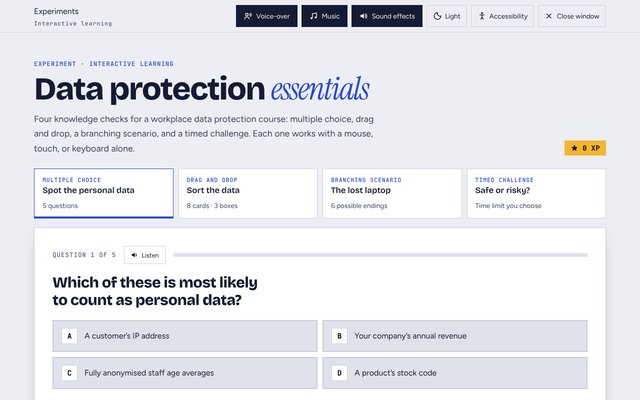
Four knowledge-check types for one course module, built as a single player: multiple choice, drag and drop, a branching scenario, and a timed challenge. I used it to test how much interaction a short module can carry before it stops helping the learner.
Built to be used by everyone
- Drag and drop has a second route. Select a card, then select a box, with a keyboard, touch, or a switch.
- The learner sets the time limit. The timed challenge offers 45 seconds, 90 seconds, or no limit.
- Reduce motion stops the typing effect, the countdown, and the confetti.
- Screen readers hear every result, and focus moves to each new question.
- A voice reads each question and result. I made the voice-over with Cartesia, and a Listen button replays it.
- Sound stays under your control. Separate buttons switch off the voice-over, the music, and the sound effects, and the quiz remembers your choice.
 Experiments
Experiment: data protection quiz lab
Four knowledge-check types in one course player: multiple choice, drag and drop, a branching scenario, and a timed challenge. Every one works with a keyboard alone, and the learner chooses the time limit.
Learning about ERTMS
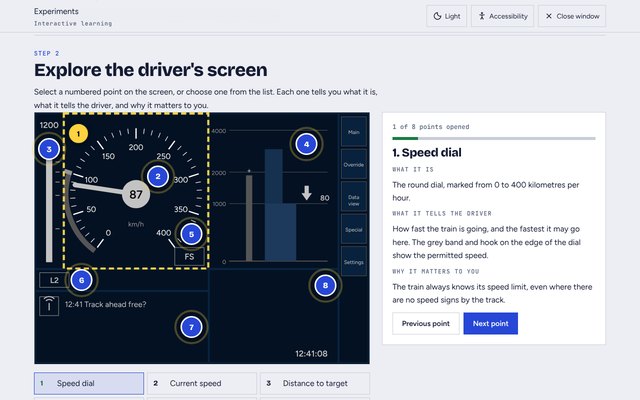
A 10-minute session for new rail colleagues on the European Rail Traffic Management System (ERTMS), which moves signal information into the cab. It follows four steps: watch, explore, check, and summarise.
- An intro video drawn in code, with a Cartesia voice-over, captions, and a transcript. Each sentence has its own recording, and the scenes follow the timing of the voice.
- An original drawing of the driver's screen with eight numbered points. They work with a mouse, touch, or a keyboard, and a list beside the screen gives the same points.
- A five-question check with feedback on every answer, and a tracker that shows which steps are done.
 Experiments
Experiment: ERTMS, signals in the cab
A 10-minute session for new rail colleagues: an intro video with captions, a driver's screen with eight points to explore, and a five-question check.
Londinium: a history project
An animated history of Roman London that runs for about five minutes, and an interactive map that goes with it. I made both with Claude, one round at a time, and kept a record of every change.
How it changed, round by round
- Research and storyboard. Claude checked the facts against the London Museum, the British Museum, and other sources. It then drew a storyboard of 14 scenes, with a script and a cast in period costume.
- First video. Real photos from Wikimedia Commons, a map of Roman London, and today's map with pulsing dots and an animated wall. Cartesia voices, mouths that move with the voice, and the track Ruins of Britain.
- Feedback. The voices sounded flat, sentences did not end cleanly, and the pauses were too short. Some character lines did not make sense, and a crossfade broke each character's entrance.
- Second video. Each sentence is now voiced on its own, with an emotion for each scene. The pauses are longer, the character lines are rewritten, entrances are one continuous shot, and a title card opens the film.
- New introduction. I rewrote the opening lines. We tested breath sounds, removed them, and slowed the reading.
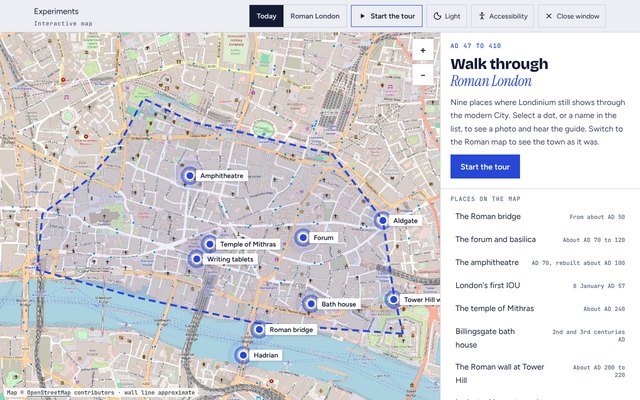
- Interactive map. Nine places, each with a photo and a narrated guide that highlights each sentence as it is spoken.
- Pronunciation. The narrator now says "Saint Paul's" in full. I tested six ways of saying "kilometres" and chose the plainest one. Both are in the pronunciation dictionary.
- Papercut rebuild. I tested three looks for the same scene: explainer, storybook, and papercut. I chose papercut. The characters were rebuilt to face the camera, with arms that move at the shoulder and elbow and open wide as they speak. Every background now has moving layers: clouds, smoke, water, flames, crowds, and a crane at work.
Rules that came out of it
- Voice a script one sentence at a time, with clear pauses between lines.
- Put a character's line after the narration that explains it, and check that it makes sense on its own.
- Keep a character's entrance and first line as one continuous shot.
- Credit every photo and map, and say when a position on a map is approximate.
- Check that everything faces the way it moves, from the people to the ships.
Still to do
- Tweak the voices. Record the introduction again at the slower speed, rather than slowing the recording, and review the emotion on every line.
- Add more to the animation. A chariot for Boudica, and people who walk through the street scenes.
- Turn the rules into a procedure. A checklist to run before every render, so the same mistakes do not happen again.
- Create or update a skill and the extended memory. Package the process as a reusable skill, and keep the rules, decisions, and project notes up to date.
 Experiments
Experiment: Londinium interactive map
Nine places in Roman London on today's map and the Roman map. Each place has a real photo and a narrated guide, and a tour visits them in order.
Animated explainers
An 80-second video to open a data protection module, built from a script with Claude. Sam, a member of the customer team, talks to the learner, and a narrator gives the rules. The same timings make the voice-over, the captions, and the transcript, so they always match.
- Captions name each speaker, so learners know who is talking.
- The transcript follows the video and highlights the line being spoken.
- I drew every illustration in code, so a scene can change without a new animation file.